Information Classification and Protection
The University has "Information Classification and Handling Standard" to classify, label and handle information resources based on their sensitivity, criticality, value, nature and the potential negative impact that could result from unauthorised access, use or disclosure.
The Microsoft Information Protection (MIP) framework is adopted to address the classification needs for email and electronic documents outlined in the standard. Sensitivity labels in the MIP let you classify email messages and documents in Microsoft 365. Once a sensitivity label is applied to an email or document, protection settings for that label are enforced. For example, the “CityUHK Only” label may be applied to a document or email such that only people who have CityUHK credentials (EID) can access it. If the content is restricted for use by specific users, the “Restricted” label may be applied.
At CityUHK, the following classifications are used to facilitate the protection process:
- CityUHK Only (#cityuonly)
Content is only accessible by people who have CityUHK credentials (i.e. EID). - Staff Only (#staffonly / #internal)
Content is only accessible by staff. - Confidential (#confidential / #classified)
Content is classified and encrypted for specific internal and external people. - Restricted (#restricted)
Content is restricted to specific users specified by the owner, and they are not allowed to share it further. - Highly Confidential (#highlyconfidential / #viewonly / #readonly)
Content is highly confidential and sensitive, which is strictly restricted to specific users for viewing only. They are not allowed to share it further, nor copy/modify/print it.
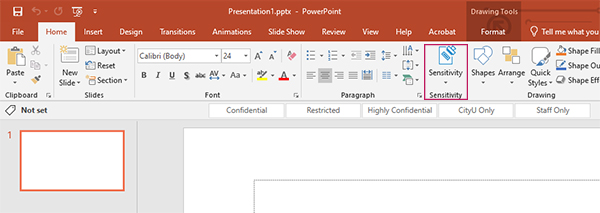
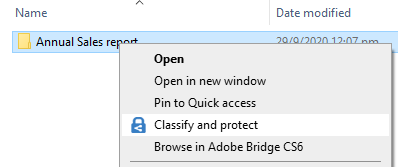
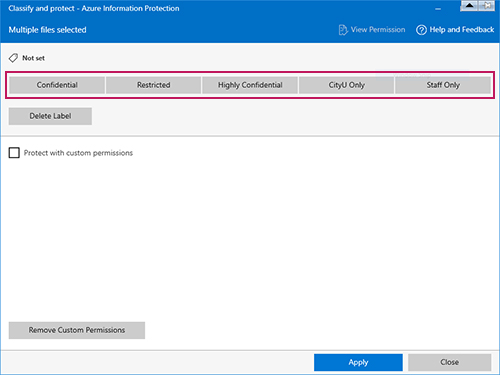
You may use these sensitivity labels in Outlook, Office applications (Word, Excel, PowerPoint), and Windows Explorer.
In Outlook:
- In “New Email”, click on “Sensitivity” or “Options” and then “Encrypt/Permission”
- Or simply, type #hashtag (listed above) in the Subject of the email
In Microsoft Office applications:
In Windows Explorer:
User Guides & FAQs
- Frequently Asked Questions
- Confidential Email
- Protected and Encrypted Files