Making Use of Dual Monitors for Online Teaching
Considering the current pandemic, the University has adopted a hybrid approach to teaching. This new way of teaching involves some students coming to the classrooms in person and some students joining the class online via Zoom. To ensure a smooth teaching experience, a second monitor could become useful by separating windows that will be shared with students from those that are used behind the scene. Those who have experience in teaching online should be well aware that there are plenty of ad hoc administration tasks during a Zoom teaching session such as admitting new participants, muting participants, answering private questions from participants and so on. These activities should be hidden from the students to avoid any unnecessary disturbance. Provision of a second monitor for teaching can come in handy.
At the beginning of last year, many instructors have requested to install second monitors in all teaching rooms for online teaching. Through months of hard work, most installations were completed in November 2020 with just a few exceptions where the lectern designs would not fit a second monitor. For details, please refer to Lecture Theatres & Classrooms.
The following shows a typical dual monitor setup where the projector displays the same output from the main computer and the second monitor being the secondary display.
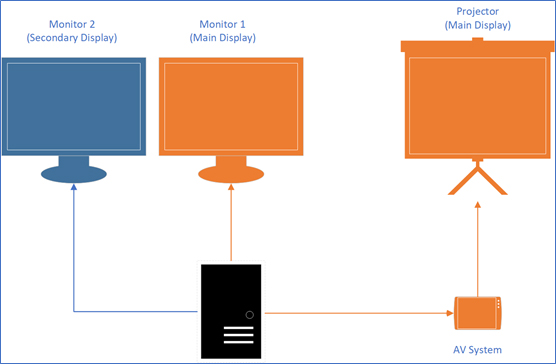
Possible usage of the second monitor
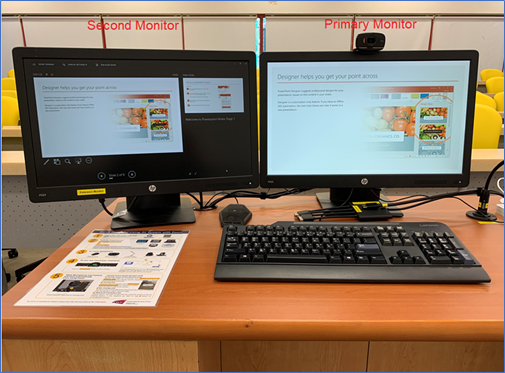
Instructors could make use of the second monitor by displaying speaker notes on the second monitor while presenting on the primary monitor as shown in the diagram below.
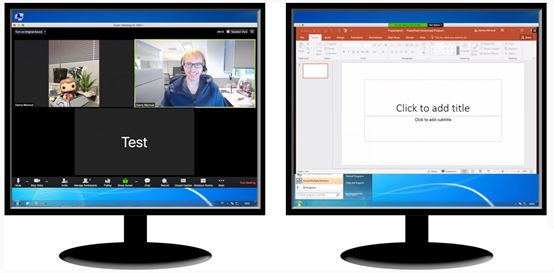
The following diagram shows another typical usage where an instructor is conducting a discussion with the remote participants on the second monitor without losing the PowerPoint slideshow on the primary monitor.
Indeed, there are many other possible usages that instructors can think of which enable them to be more productive. In the next section, we shall discuss how a dual monitor setup can enhance teaching in Zoom.
Teaching with Dual Monitors in Zoom
Zoom is designed ready for dual-monitors which allows the video window layout and screen share to be flexibly placed between two monitors. Gallery or speaker view can be displayed on one monitor while the other monitor displays a content share.
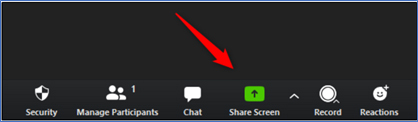
When there are two monitors, instructors can share either one of the monitors display to students. To start the screen sharing:
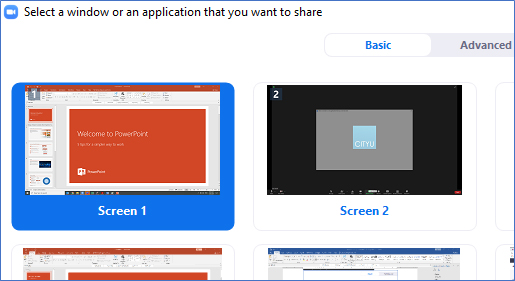

For more information, please refer to Using dual monitors with the Zoom desktop client.
Other equipment to help online teaching
In addition to the provision of dual monitors, other equipment is also installed in the teaching rooms to help online teaching. They are listed below:
- Tracking Camera
A tracking camera is installed at the back of each teaching room. With the tracking power, the camera detects the speaker and follow the speaker no matter where he/she walks within the specified area (marked with yellow lines on the floor). (Ref: IT News on "Enhanced Teaching and Learning with AI Enabled Tracking Cameras")

- Webcam
A small but dedicated webcam is mounted on top of the primary monitor.

The webcam is different from the tracking camera in a sense that it does not have the power of tracking and cannot follow the movement of the speaker. However, instructors sometimes prefer this camera as it can focus more on their facial expression. Since there is a choice between using the tracking camera and webcam, instructors are required to make sure that the one they are using is the one that they need.
- Table Microphone
A table microphone helps isolate the instructor’s voice and provides participant privacy in a shared space during discussions.

- Document Camera
Document cameras are sometimes called visualizers and there are three types of these devices installed.


In the conference situation, the document cameras provide the means for displaying written content in real time to participants. Instructors can use the share content method or change video input method to display the document camera’s output to the students.
During such challenging times, it is hoped that the above facilities can enable students learning remotely to have similar learning experience as if they were on campus, while allowing faculties to teach better. As always, the Computing Services Centre (CSC) strives to make continuous improvements for teaching and learning experience using IT.