Changes in the Teaching and Learning Environment
?
Some hardware and software in the CSC Teaching Studios have been upgraded this summer:
PC Hardware
Half of the CSC Teaching Studios, around 500 PCs, have been upgraded to newer hardware as described in the table below. By using the Citrix Provisioning Services (PVS), these PCs have been configured as diskless start-up. The computers boot up from the network and read the virtual hard disk content from the PVS servers on the fly. As the write operations are cached on the device RAM temporarily, users are advised to use their own removable storage devices to store work files, such as USB flash drives and USB HDD/SSD. The USB ports on these PCs are version 3.0 which can support fast USB devices with a data transfer rate of up to 5Gbps.
|
Location
|
Workstation Configuration
|
|
Teaching Studio AC2-4109
Teaching Studio AC2-4200
Teaching Studio AC2-4208
Teaching Studio AC2-4307
Teaching Studio AC2-4400
Teaching Studio AC2-4412
Open Area on AC2 G/F
Open Area on AC2 4/F
Open Area on AC2 5/F
|
Lenovo ThinkCentre M900 SFF computer
· 3.30 GHz Intel i5-6600 quad-core processor
· 2.67 GB usable RAM for 32-bit Windows 7
· 7.89 GB usable RAM for 64-bit Windows 10
· 22" Widescreen LCD monitor (1920 x 1080 pixels)
· DVD/CD Writer drive
· Front-side USB 3.0 ports (5 Gbps)
· Front-side headphone jack
· Front-side-microphone jack
|
Operating Systems
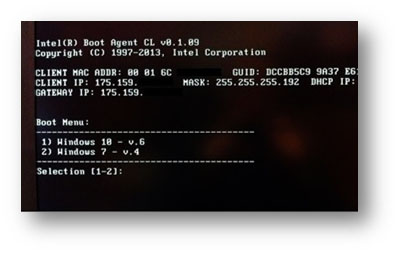
The Windows 8.1 system has been upgraded to Windows 10 (64-bit) with Update 1511, while the Windows 7 (32-bit) system will still be available for some time. For new PCs using the Citrix PVS, a black & white character-based Boot Menu will be displayed and users may either input “1” and press <Enter> key to select Windows 10, or input “2” and press <Enter> key to select Windows 7. For old PCs using the Reborn Card to boot up, a blue-coloured menu will be displayed and users may press the <up>/<down> arrow keys to select either “Windows 10” or “Windows 7” followed by the <Enter> key
|

|
|
Fig. 1 New PC using Citrix PVS
|
Fig. 2 Old PC using Reborn Card
|
The default web browser in Windows 10 is still Internet Explorer 11 while the Edge browser is available on the Taskbar and can be run manually. However, most of the Privacy settings in Windows 10 are turned off. Users may turn them on if needed.
Microsoft Office
The Microsoft Office has been upgraded to version 2016 on both Windows 10 (64-bit) and Windows 7 (32-bit).
Microsoft Visual Studio
The Microsoft Visual Studio has been upgraded to version 2015 on Windows 10 (64-bit). On Windows 7 (32-bit), the Microsoft Visual Studio remains as version 2012.
For more information on Teaching Studios, please visit the CSC web at
For a list of software available on the CSC Student LAN, please visit the CSC web at
http://www.pd4n48r.xyz/csc/deptweb/facilities/terminal-area/software.htm