Improving Email Security with Information Rights Management
What is Information Rights Management?
Information Rights Management (IRM) is a technology that protects sensitive information from unauthorized access. It allows information owners/publishers to distribute sensitive information to specific individuals. When an email or a document is protected by IRM, it becomes encrypted and a set of access/usage restrictions may be applied to it. Typical restrictions include preventing recipients from forwarding the email, printing the document or copying the text.
Service Architecture
Public Key Infrastructure (PKI) and Identity Based Encryption (IBE) are two commonly used architectures for distributing encrypted (protected) information. We will briefly discuss a simplified version of the two architectures here.
Public Key Infrastructure (PKI)
Public Key encryption uses a key pair to protect and access sensitive information. The key pair consists of a public key and a private key. Suppose John wants to share sensitive information with Peter securely. John will use Peter’s public key to protect (encrypt) the information and share the encrypted information with Peter. When Peter receives the encrypted information, Peter has to use his own private key to decrypt it, otherwise, he will not be able to read the information.
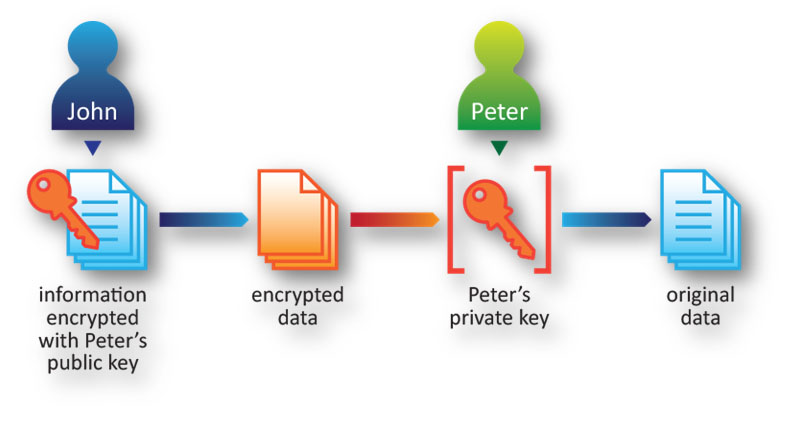
To ensure the integrity and ownership of keys (or certificates), a trusted party, called Certification Authority (CA), is required in PKI for managing the issuing, distribution, verification, and revoking of certificates. We will not go into details here.
Identity Based Encryption (IBE)
IBE, as compared with PKI, eliminates the need of a complicated structure for certificate management. Instead, a Key Server is introduced here. The sender, John, uses the email address of the recipient, Peter, to generate Peter’s public key for encrypting the information he wants to share with Peter. When Peter receive the encrypted information, Peter authenticates to the Key Server, automatically and transparently obtains his private key to decrypt the information. This mechanism equally protects sensitive information but is both simple and easy to use.
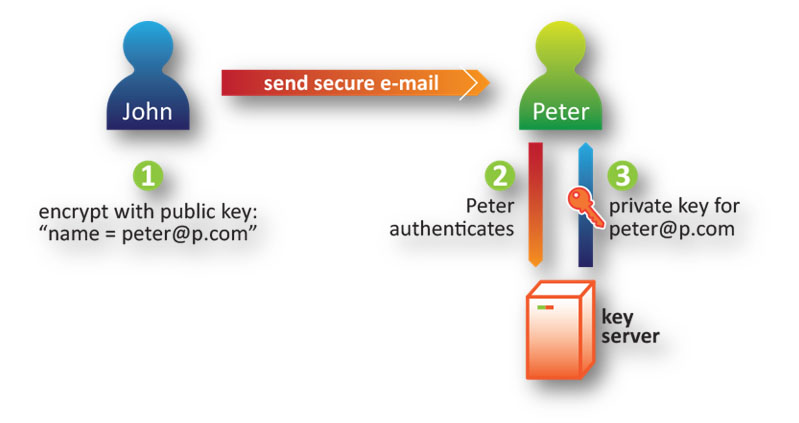
IBE relies on the authentication mechanisms which in turn depend on the awareness of users in protecting their own credentials. In the event that a user disclosed his/her credential (usually username/password) unintentionally, IBE-protected contents could also be leaked. Similarly, PKI-protected contents will be leaked if the corresponding private key is stolen.
However, changing the password could immediately stop IBE-protected contents from being further distributed if there is an incident of credential disclosure. Yet if the unintended recipients have already made a copy in an alternative format, e.g. hardcopy, prior to the password change, obviously there is no way you can make the contents inaccessible to them. In contrast, for PKI, if an incident of private key disclosure occurs, there is no way to stop those stolen PKI-protected contents from being further distributed, as the newly generated PKI key pair could only protect new contents.
Secure Email Solution
According to the Gartner report in July 2014, market leaders such as Proofpoint, Cisco IronPort and Microsoft Azure Rights Management (Azure RMS) are all using Identity Based Encryption (IBE) for providing secure email solutions. While Proofpoint does not have local Hong Kong presence, the Central IT has performed an evaluation and made a comparison between Cisco IronPort and Microsoft Azure RMS.
One of the advantages of Microsoft Azure RMS over Cisco IronPort is the access control on the attachments remains enforced even after they are detached from email. This offline protection feature of Azure RMS is effective in reducing the risk of unintended information disclosure through off-line media such as USB thumb drives.
In addition, Cisco IronPort does not support Microsoft Exchange Online, the current email system of the university. As such, the Central IT had focused entirely on the evaluation of Azure RMS in the past few months.
Microsoft Azure Rights Management (Azure RMS)
Azure RMS uses encryption, identity, and authorization policies to protect email messages. Office documents, including Word, Excel and PowerPoint files, will be protected automatically by Azure RMS when they are attached to a protected email message. Once protected, users must be:
- Authenticated. Every time the protected email message or the corresponding protected attachments are being accessed, the Azure RMS will request for users' credentials. Users must be authenticated by signing in to Office 365 with their O365 accounts.
- Authorized. After authentication, Azure RMS processes the document policy associated with the email (or the corresponding
protected attachments) and then decides if the authenticated user should be granted permission to view, print or forward the email/attachments.
It works across multiple devices—phones, tablets, PCs and Macs. The following table summarizes the platform and client tools that work with Azure RMS protected email.
|
Device Operating System
|
Email
|
Email Attachments protected with Azure RMS (Word, Excel, PowerPoint)
|
|---|---|---|
|
Windows
|
Outlook 2010/2013
Outlook Web App (OWA) via browsers such as Internet Explorer, Firefox, and Google Chrome
|
Office 2010/2013
Office Online via browsers such as Internet Explorer, Firefox and Google Chrome
|
|
Mac OS X
|
Outlook for Mac (Office Pro Plus)
Outlook Web App (OWA) via browsers such as Safari, Firefox and Google Chrome
|
Office Online via browsers such as Safari, Firefox and Google Chrome
|
|
iOS
|
OWA for iOS
|
Not supported at the moment
|
|
Android
|
OWA for Android
|
Not supported at the moment
|
|
Windows Phone 8.1
|
Outlook Mobile
|
Not supported at the moment
|
To share PDF and image files securely over email, Azure RMS provides a tool called “RMS Sharing Application”. With RMS Sharing Application, users may protect PDF and image files with Azure RMS by converting them into pfiles (protected files). Pfiles, such as PPDF (protected PDF), can be viewed with RMS Sharing Application of various platforms (including Windows, Mac OS X, iOS, Android, and Windows Phone) by authorized users.
To be available soon
The infrastructure of providing Azure RMS for the university is in place and the Central IT is now piloting and fine-tuning the service. It will be available for all university staff in Semester A 2015-2016. If departments would like to have a try on the service beforehand, please feel free to contact the Computing Services Centre at csc@cityu.edu.hk.
References