CityU WLAN Performance Issues
Due to the pervasive availability of Wi-Fi devices such as notebook computers and smart phones, the demand for wireless connectivity throughout the university has grown significantly in the past few years.
Recently, we have received complaints saying that users experienced bad throughput in densely populated areas such as Library and 4/F Mall even though the radio signals were good. We worked with the engineer of the Aruba Networks (manufacturer of our WLAN equipment) immediately to troubleshoot the problem and found that clients using 802.11b/g/n in the 2.4GHz band were affected while clients using 5GHz were not.
As an interim solution before the exact problem can be located and resolved, a workaround was immediately put in place by temporarily disabling the 802.11n in the 2.4GHz band. This was a transparent setting, meaning that users do not need to do anything on the client side because all Wi-Fi devices should be able to select the appropriate operating mode (802.11b/g in 2.4GHz or 802.11a/n in 5GHz) automatically. From the feedbacks, users have been able to use the WLAN at satisfactory performance even in peak periods. Aruba Networks was then urged to perform more lab tests to identify a permanent solution for the problem encountered.
Joint Universities Computer Centres (JUCC) and Aruba Network’s Joint WLAN Scalability Testing
On a separate recent occasion, to learn more about how the WLAN serves our users and to understand its performance to seek areas of improvement, we have participated in the Joint Universities Computer Centres’ (JUCC) study on the Aruba Networks. A series of tests was conducted to evaluate the WLAN performance in two challenging live campus environments - classroom (confined area with fewer clients) and library (large area with many clients). The following shows the system diagram of the test:

Below describe the scope of tests:
1. 802.11n Performance
The aim of the test is to compare the performance of clients using legacy 802.11abg and the new 802.11n standard (see test result (1) below)
2. Benefits of using Aruba’s Adaptive Radio Management (ARM) technology (see test result (2,3,4) below)
The test aims to study how ARM affects the wireless performance:
- Airtime Fairness - provides a fair distribution of network's airtime across clients
- Traffic shaping for mixed client-types (802.11bgn) - maximizes wireless performance with mixed client types
- Impact of legacy 802.11 b/g clients on 802.11n performance - maximizes wireless performance with mixed client types
- Band-Steering - drives clients to optimal spectrum for better performance and reliability
- Co-channel Interference Management and Channel Reuse - avoids RF interfering and maximizes performance when overlapping channels are used.
- Spectrum Load Balancing - spreads clients across wireless spectrum to improve scalability
3. High Density Stress Tests
Maximum clients per radio - over 100 clients connected simultaneously to a single AP, with 1 Mbps traffics per client.
4. Video over WLAN
To test the performance of streaming multicast video over WLAN for learning and entertainment applications (see test result (4) below)
5. Voice over WLAN
To test the quality of Voice over WLAN (VoWLAN) in a shared environment (data + voice) on 802.11n network (see test result (5) below)
Test Results
The test results are summarized as below:
1. Greater than 120 Mbps throughput was achieved across 802.11n clients, no matter what kind of RF chip sets and OS were used. Aruba’s adaptive 802.11n networks can easily perform 6 times better than that of legacy 802.11abg networks.

2. By turning on the Aruba’s ARM technology such as Band-Steering, Co-channel Interference Management and Channel Reuse, etc., we can optimize dual-band client’s average throughput and maximize the RF capacity in dense deployment.
Band-Steering Test
The following table shows the effect and benefit of Band-Steering function to 10 dual-band clients attached to the same Access Point (AP). The numbers in red indicate 2.4 GHz association and green indicate 5 GHz association. When band steering was enabled, most clients were steered to the higher capacity and less congested 5 GHz band to achieve better average throughput.
|
No Band Steering (Mbps) |
Band Steering (Mbps) |
|
|
Client 1 |
9.4 |
27.1 |
|
Client 2 |
5.3 |
1.7 |
|
Client 3 |
0.2 |
25.5 |
|
Client 4 |
10.8 |
1.8 |
|
Client 5 |
9.5 |
19.3 |
|
Client 6 |
74.8 |
6.0 |
|
Client 7 |
8.0 |
8.7 |
|
Client 8 |
7.1 |
15.6 |
|
Client 9 |
8.6 |
13.7 |
|
Client 10 |
0.6 |
15.3 |
Co-channel Interference Management and Channel Reuse Test
Aruba uses intelligent rate control algorithm and adjusts receive sensitivity to avoid RF interfering and maximizes channel throughput performance when overlapping channels are used.
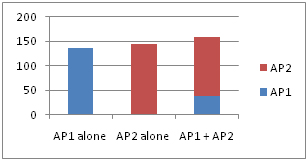
In the test, two APs (AP1 and AP2) were setup to advertise different SSIDs on the same channel and two clients each was associated to one of the two APs in different scenarios (as described below). Test results were obtained by running TCP throughput tests on each client individually and both clients simultaneously for the following scenarios: when AP1 alone is turned on, when AP2 alone is turned on, and when both AP1 and AP2 are turned on. We could see that the observed improvement in channel throughput was more than 10% (from 135 Mbps to 159Mbps) when both APs are turned on implying that RF interference indeed has been avoided and channel throughout does increase even when overlapping channels are used.
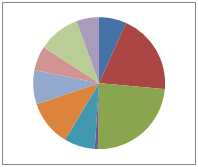
3. Aruba’s ARM technology also improves user experience by enforcing airtime fairness among clients and provides reliable connection in densely populated circumstance such as 100 clients attaching to a single AP.
The following pie charts show the airtime (slices) sharing among 10 clients (different colour for each client) was more evenly distributed when the “Fair Access” mode was enabled.
(a) Default Access (b) Fair Access

4. Aruba is able to support high-definition streaming video over Wi-Fi. During the test, 15 clients were able to view high quality, jitter-free multicast video with video streams ranging from 2.5-12.5Mbps.
5. Aruba is capable of providing reliable and smooth voice over Wi-Fi solution even on the AP with heavy data loads (100Mbps of data traffic).
Conclusion
From the gathered results, we are able to further improve the CityU WLAN in terms of user experience and performance by upgrading the Aruba’s firmware and tuning the parameters of the ARM according to the above findings.
As the WLAN technology is becoming more mature and advanced, it is not surprising that more and more users choose to unplug their network cables and go wireless.